Types of computer....
Laptop...
Its a potable computer designed to fit on the lap although many people put them on a table or desk and take them out with them. It carries out the same functions as a desktop computer Because laptops are meant to be used on the go, they have a battery which allows them to operate without being plugged into a power outlet. Laptops also include a power adapter that allows them to use power from an outlet and recharges the battery. Most laptops also include several I/O ports, such as USB ports, that allow standard keyboards and mice to be used with the laptop. Modern laptops often include a wireless networking adapter as well, allowing users to access the Internet without requiring any wires.
 Desktop computers..
They are designed for regular use in one location, such as a desk also its not very flexiable like a laptop itself. At home, most desktop computer users also purchase a printer. In businesses and increasingly at home, desktop computers can be interconnected and can share resources such as printers by being connected to a local area network (LAN).It may be a tower (also known as a system unit) or an all-in-one machine, such as an iMac. Unlike laptops and other portable devices, desktop computers cannot be powered from an internal battery and therefore must remain connected to a wall outlet.
Desktop computers..
They are designed for regular use in one location, such as a desk also its not very flexiable like a laptop itself. At home, most desktop computer users also purchase a printer. In businesses and increasingly at home, desktop computers can be interconnected and can share resources such as printers by being connected to a local area network (LAN).It may be a tower (also known as a system unit) or an all-in-one machine, such as an iMac. Unlike laptops and other portable devices, desktop computers cannot be powered from an internal battery and therefore must remain connected to a wall outlet.
 Notebook..
Very Similar to a laptop but even more compact. The name comes from how small it is comparing it to a notebook.
Notebook..
Very Similar to a laptop but even more compact. The name comes from how small it is comparing it to a notebook.
 Netbook..
Their extremely small size and very low price tag make them very attractive to people looking for a low cost yet portable laptop that they can bring just about anywhere. Most netbooks are not what you would consider fast when it comes to computing. They are not designed for fast speeds but more for power efficiency. They need enough processor performance to handle basic computing tasks such as web browsing, email, word processing, spreadsheets and basic photo editing
Netbook..
Their extremely small size and very low price tag make them very attractive to people looking for a low cost yet portable laptop that they can bring just about anywhere. Most netbooks are not what you would consider fast when it comes to computing. They are not designed for fast speeds but more for power efficiency. They need enough processor performance to handle basic computing tasks such as web browsing, email, word processing, spreadsheets and basic photo editing
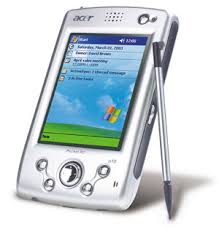
 Personal digital assistant...
a handheld device that combines computing, telephone/fax, Internet and networking features. A typical PDA
Personal digital assistant...
a handheld device that combines computing, telephone/fax, Internet and networking features. A typical PDA can function as a cellular phone, fax sender, Web browser and personal organizer. Unlike portable computers, most PDAs began as pen-based, using a stylus rather than a keyboard for input. This means that they also incorporated handwriting recognition features. Some PDAs can also react to voice input by using voice recognition technologies. PDAs of today are available in either a stylus or keyboard version.
 Task 1.11....
Would a desktop or a portable computer be most suitable for the following people an why? ..
Teacher... I think a laptop would be more suitable as they would need access to microsoft word or powerpoints and to save all of there work and it would be more easier for them as they can bring there work anywhere with them even to teach.
Doctor... would be more suitable for a desktop computer as it holds and stores alot of infomation and would be easier to have in there office as most doctors have these days.
News reporter... i think they would be more suitable to a PDA as they will be working most of the time and getting loads of info all at once from other people. Also would be able to access internet anytime they wanted to.
Website designer... A desktop computer would be more suitable as they would probably have to work at a desk most of the time and would need printers and better layouts on the computer.
Traffic Wardens would suit a PDA device as they are out alot of the time and can acess the internet anytime.
Buying a computer....
Most modern computers come with a slew of technical features and specifications. Features differ from one computer to another and are commonly highlighted by sellers and retailers to promote the computer to customers. Knowing how each feature affects a computer's performance and value will help you make an informed decision.
Task 1.11....
Would a desktop or a portable computer be most suitable for the following people an why? ..
Teacher... I think a laptop would be more suitable as they would need access to microsoft word or powerpoints and to save all of there work and it would be more easier for them as they can bring there work anywhere with them even to teach.
Doctor... would be more suitable for a desktop computer as it holds and stores alot of infomation and would be easier to have in there office as most doctors have these days.
News reporter... i think they would be more suitable to a PDA as they will be working most of the time and getting loads of info all at once from other people. Also would be able to access internet anytime they wanted to.
Website designer... A desktop computer would be more suitable as they would probably have to work at a desk most of the time and would need printers and better layouts on the computer.
Traffic Wardens would suit a PDA device as they are out alot of the time and can acess the internet anytime.
Buying a computer....
Most modern computers come with a slew of technical features and specifications. Features differ from one computer to another and are commonly highlighted by sellers and retailers to promote the computer to customers. Knowing how each feature affects a computer's performance and value will help you make an informed decision. T
here are many kinds of computers, from the familiar desktop computer to the business or scientific mainframe to the thousands of different, specialized computers such as the ones found today in automobiles and cell phones. All computers have a few operational features in common.
Input: There is a way to direct or inform the computer. Examples are the keyboard and mouse, removable disks, as well as external instruments or networks.Processing: The computer has a processing area that can do work. The CPU, or central processing unit, can be designed or instructed to perform any number of different tasks.
Output: There is a way the computer can export results. Examples are video monitors, speakers, removable disks, instruments, or networks.Most computers also have one or more ways of storing information within. Memory: One type of memory (RAM: random-access memory) can retain information for the computer's own use while processing data; another kind (ROM: read-only memory) can hold necessary reference information even while the computer is off.
Storage: Typically onboard disk or nonvolatile RAM.